
Computer Science · Information representation and multimedia
This chapter covers how computers represent information using binary, denary, and hexadecimal number systems, including binary arithmetic. It also explores character encoding, multimedia representation for images and sound, and the essential techniques of file compression.
Binary — Base two number system based on the values 0 and 1 only.
Computers use binary because their internal components, like switches, can only be in one of two states: ON (1) or OFF (0). This fundamental system underpins all digital data representation, much like a light switch that can only be on or off.
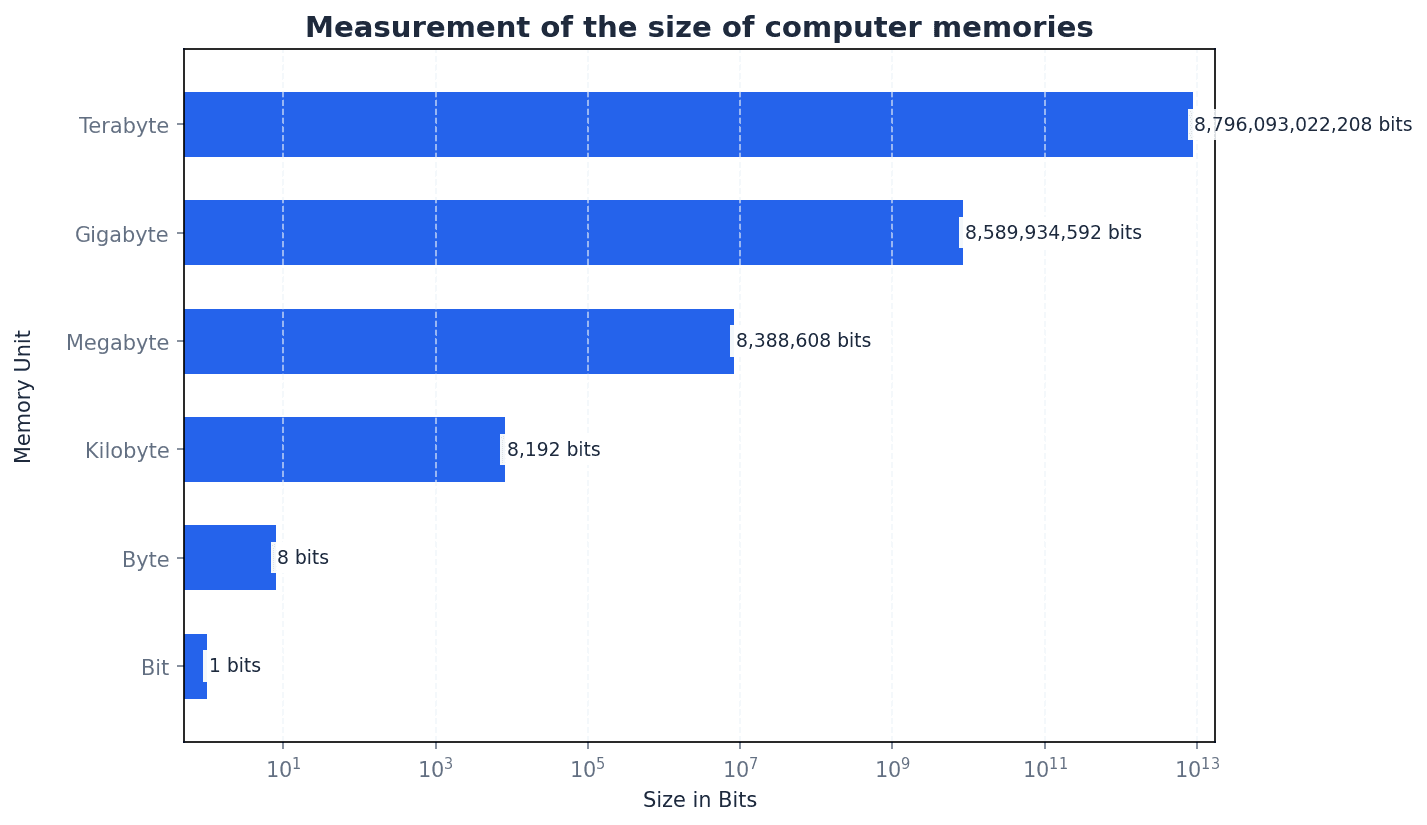
Bit — Abbreviation for binary digit.
A bit is the smallest unit of data in a computer, representing a single 0 or 1. Multiple bits are combined to represent more complex information, similar to how many coins together can represent a larger number, with each coin showing only heads or tails.
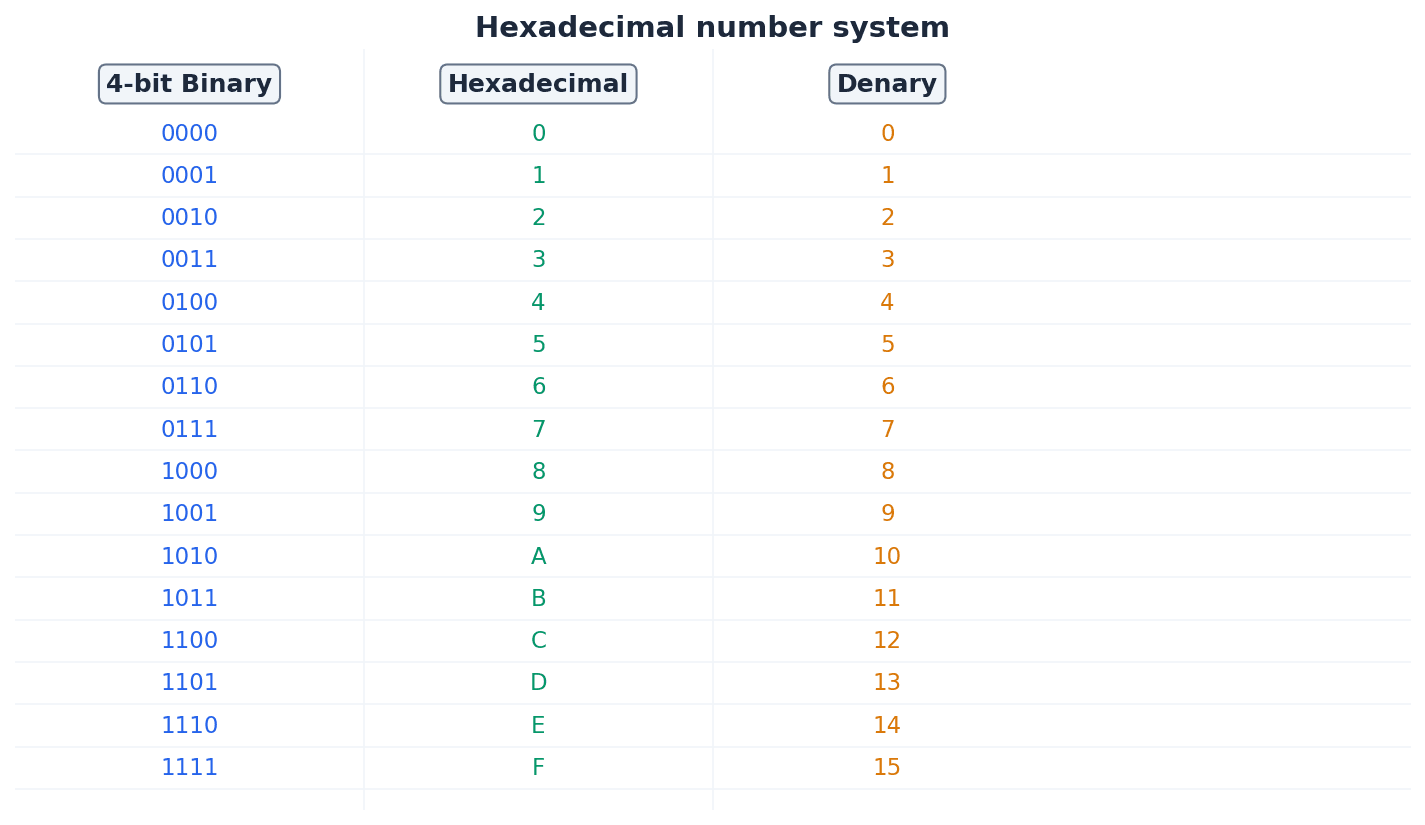
Hexadecimal — A number system based on the value 16 (uses the denary digits 0 to 9 and the letters A to F).
Hexadecimal is a base-16 system that provides a more compact and human-readable representation of binary numbers, as each hexadecimal digit corresponds to four binary bits. It is often used in computing for memory addresses and colour codes, acting as a shorthand for long strings of 0s and 1s.
Binary-coded decimal (BCD) — Number system that uses 4 bits to represent each denary digit.
BCD represents each denary digit (0-9) with its own 4-bit binary code. This system is particularly useful for applications requiring exact decimal representation, such as financial calculations, where rounding errors from pure binary floating-point numbers are unacceptable. It's like converting each digit of a number separately into its own 4-bit binary code.
Students often think BCD is the same as converting a denary number to binary, but actually BCD encodes each denary digit individually, leading to a different binary string.
Computers fundamentally operate using binary, but denary (base 10) is used by humans, and hexadecimal (base 16) offers a more compact representation of binary data. Conversion between these systems is crucial. For instance, converting binary to hexadecimal involves splitting the binary number into 4-bit groups and converting each group to its hexadecimal equivalent. Conversely, converting hexadecimal to binary involves converting each hexadecimal digit into its 4-bit binary code.
Practice conversions between all three number systems (binary, denary, hexadecimal) until they are quick and accurate, as these are foundational marks.
One’s complement — Each binary digit in a number is reversed to allow both negative and positive numbers to be represented.
To find the one's complement of a binary number, all 0s become 1s and all 1s become 0s. This method is one way to represent negative numbers, similar to flipping a switch for every light in a room to reverse its state.
Two’s complement — Each binary digit is reversed and 1 is added in right-most position to produce another method of representing positive and negative numbers.
Two's complement is widely used in computers for representing signed integers because it simplifies arithmetic operations and avoids having two representations for zero. It's like finding the 'opposite' of a number, but with an extra step of adding one to make the arithmetic work seamlessly.
Students often confuse one's complement with two's complement, especially the 'add 1' step for two's complement. Remember that two's complement involves inverting bits THEN adding 1.
Sign and magnitude — Binary number system where left-most bit is used to represent the sign (0 = + and 1 = –); the remaining bits represent the binary value.
In sign and magnitude, the most significant bit indicates whether the number is positive or negative, while the rest of the bits represent the absolute value. This method is intuitive, like writing a plus or minus sign before a number, but complicates arithmetic operations.
Binary addition follows similar rules to denary addition, with carries occurring when the sum of bits is 2 or more. For binary subtraction, the two's complement method is commonly used. This involves converting the subtrahend (the number being subtracted) into its two's complement and then adding it to the minuend. Any overflow bit generated during this addition is typically ignored for the final result.
When performing binary subtraction, always convert the subtrahend to its two's complement and then add; this is a common exam technique.
Memory dump — Contents of a computer memory output to screen or printer.
A memory dump displays the raw data stored in a computer's memory, typically in hexadecimal format, which is useful for debugging software and diagnosing system errors. It's like taking a snapshot of everything currently stored in the computer's active memory, presented in a format that programmers can read.
Character set — A list of characters that have been defined by computer hardware and software.
A character set is a collection of characters that a computer system can recognize and display, each assigned a unique numerical code. It is essential for computers to process and display human-readable text, acting as the complete alphabet and symbol list a computer 'knows'.
ASCII code — Coding system for all the characters on a keyboard and control codes.
ASCII (American Standard Code for Information Interchange) is a 7-bit character encoding standard that represents text characters in computers. It includes uppercase and lowercase letters, numbers, punctuation, and control characters, forming the basis for text communication, much like a universal dictionary where every character has a specific numerical code.
Unicode — Coding system which represents all the languages of the world (first 128 characters are the same as ASCII code).
Unicode is a universal character encoding standard designed to represent text from all of the world's writing systems. It uses up to four bytes per character, allowing for a vast number of characters compared to ASCII, making it suitable for global applications. It's like an expanded, global dictionary that includes every character from every language.
Students often think ASCII can represent all characters in the world, but actually it is limited to 128 (or 256 for extended ASCII) characters, primarily English-based. Unicode is required for comprehensive character sets.
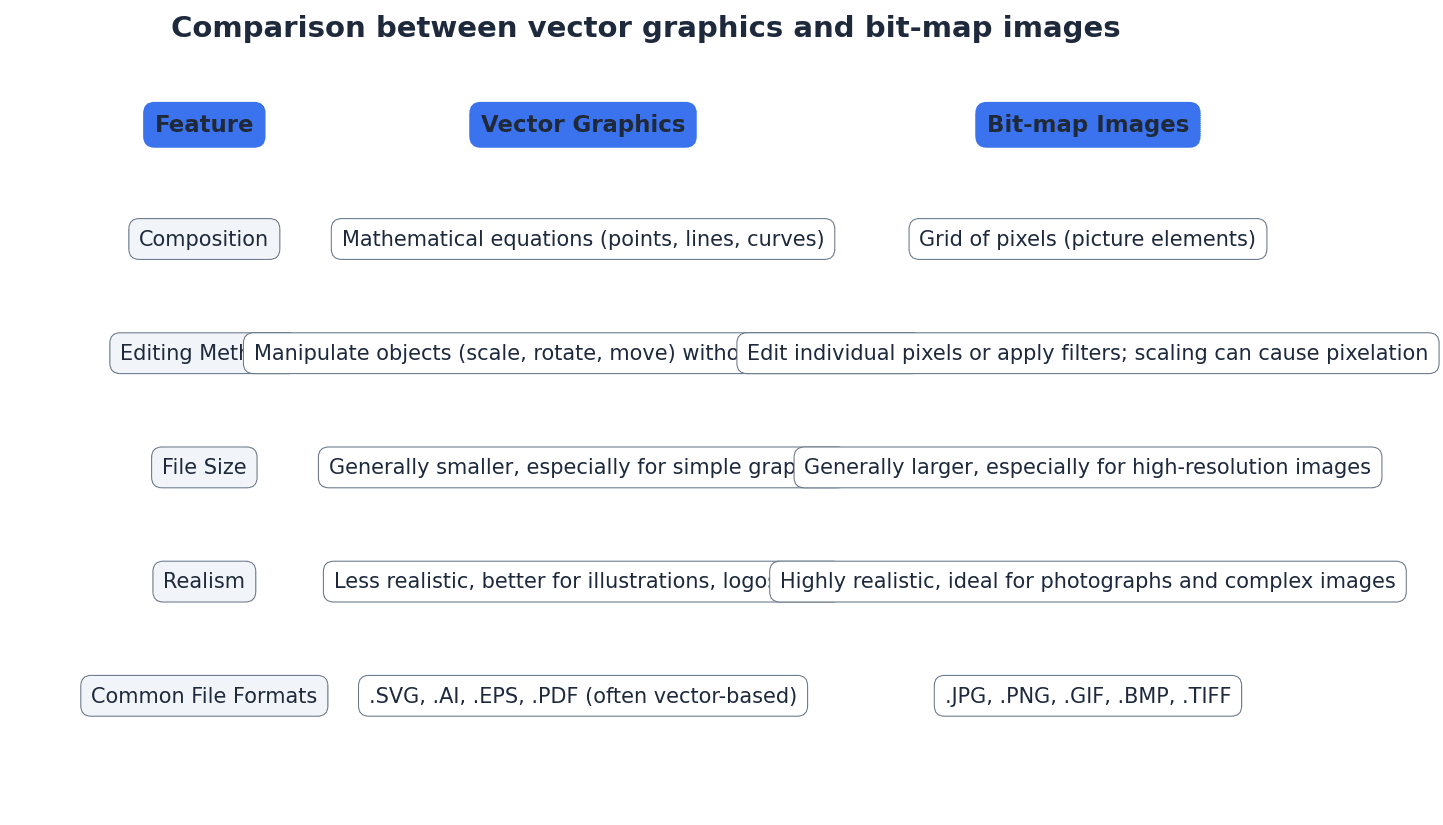
Bit-map image — System that uses pixels to make up an image.
A bit-map image, also known as a raster image, stores an image as a grid of individual pixels. Each pixel's colour information is stored, making them suitable for photographs and realistic images, but they can become pixelated when scaled up. This is like drawing a picture by filling in tiny squares on a grid.
Pixel — Smallest picture element that makes up an image.
A pixel is a single point in a raster image or on a display screen. Each pixel contains colour information, and collectively, millions of pixels form a complete image, much like a single tiny coloured tile in a mosaic.
Colour depth — Number of bits used to represent the colours in a pixel, e.g. 8 bit colour depth can represent 2^8 = 256 colours.
Colour depth determines the number of distinct colours that can be represented by each pixel in an image. A higher colour depth (more bits per pixel) allows for a wider range of colours and a more realistic image, but also increases file size. It's like having a box of crayons; a higher colour depth means more crayons to draw with.
Bit depth — Number of bits used to represent the smallest unit in, for example, a sound or image file – the larger the bit depth, the better the quality of the sound or colour image.
Bit depth is a general term referring to the number of bits used to store information about a single sample (e.g., a pixel's colour or a sound's amplitude). In images, it's synonymous with colour depth; in sound, it's sampling resolution. Think of it as the precision of measurement.
Number of colours from bit depth
Used for calculating the number of possible colours in an image given its colour depth, or the number of amplitude values for sound given its sampling resolution.
Image resolution — Number of pixels that make up an image, for example, an image could contain 4096 × 3192 pixels (12 738 656 pixels in total).
Image resolution specifies the total number of pixels in an image, typically expressed as width × height. Higher image resolution means more detail and sharpness, but also results in larger file sizes. It's like the total number of tiny squares on your drawing grid.
Screen resolution — Number of horizontal and vertical pixels that make up a screen display.
Screen resolution refers to the fixed number of pixels a display device can show. If an image's resolution exceeds the screen's resolution, the image may be scaled down or cropped, potentially affecting its displayed quality. This is like the fixed number of tiny lights on your TV screen.
Students often confuse image resolution (total pixels in an image) with screen resolution (pixels on a display device). Remember that image resolution is an intrinsic property of the image file, while screen resolution is a property of the display device.
Resolution — Number of pixels per column and per row on a monitor or television screen.
Resolution, in a general sense, refers to the detail level of an image or display. For screens, it's the pixel dimensions; for images, it's the total pixel count. Higher resolution generally means more detail, like the clarity of a photograph.
Pixel density — Number of pixels per square centimetre.
Pixel density, often measured in pixels per inch (ppi), indicates how many pixels are packed into a given physical area. Higher pixel density results in sharper, clearer images on a display, especially when viewed up close. Imagine fitting more tiny lights into the same size area on a screen.
Bit-map image file size (bits)
This formula calculates the raw uncompressed file size in bits. To get bytes, divide by 8. To get MB or MiB, further division is needed.
Pixel density (ppi)
This formula calculates the pixel density in pixels per inch (ppi) for a given screen resolution and diagonal screen size.
For image file size calculations, remember the formula: `File size (bits) = Image width × Image height × Bit depth`, and convert to bytes/KB/MB if requested.
Students often assume bit-map images can be scaled indefinitely without quality loss, but actually they lose sharpness and become pixelated when enlarged because the number of pixels remains fixed.
Vector graphics — Images that use 2D points to describe lines and curves and their properties that are grouped to form geometric shapes.
Vector graphics are created using mathematical descriptions of geometric shapes (points, lines, curves, polygons) rather than a grid of pixels. This allows them to be scaled to any size without loss of quality, making them ideal for logos and illustrations. It's like giving a computer instructions to draw shapes using mathematical formulas.
Bit-map images are composed of pixels and are suitable for photographs and realistic images, but they pixelate when scaled. Vector graphics, on the other hand, are defined by mathematical descriptions of shapes, allowing them to be scaled infinitely without any loss of quality. This makes vector graphics ideal for logos, illustrations, and designs that need to be resized frequently.
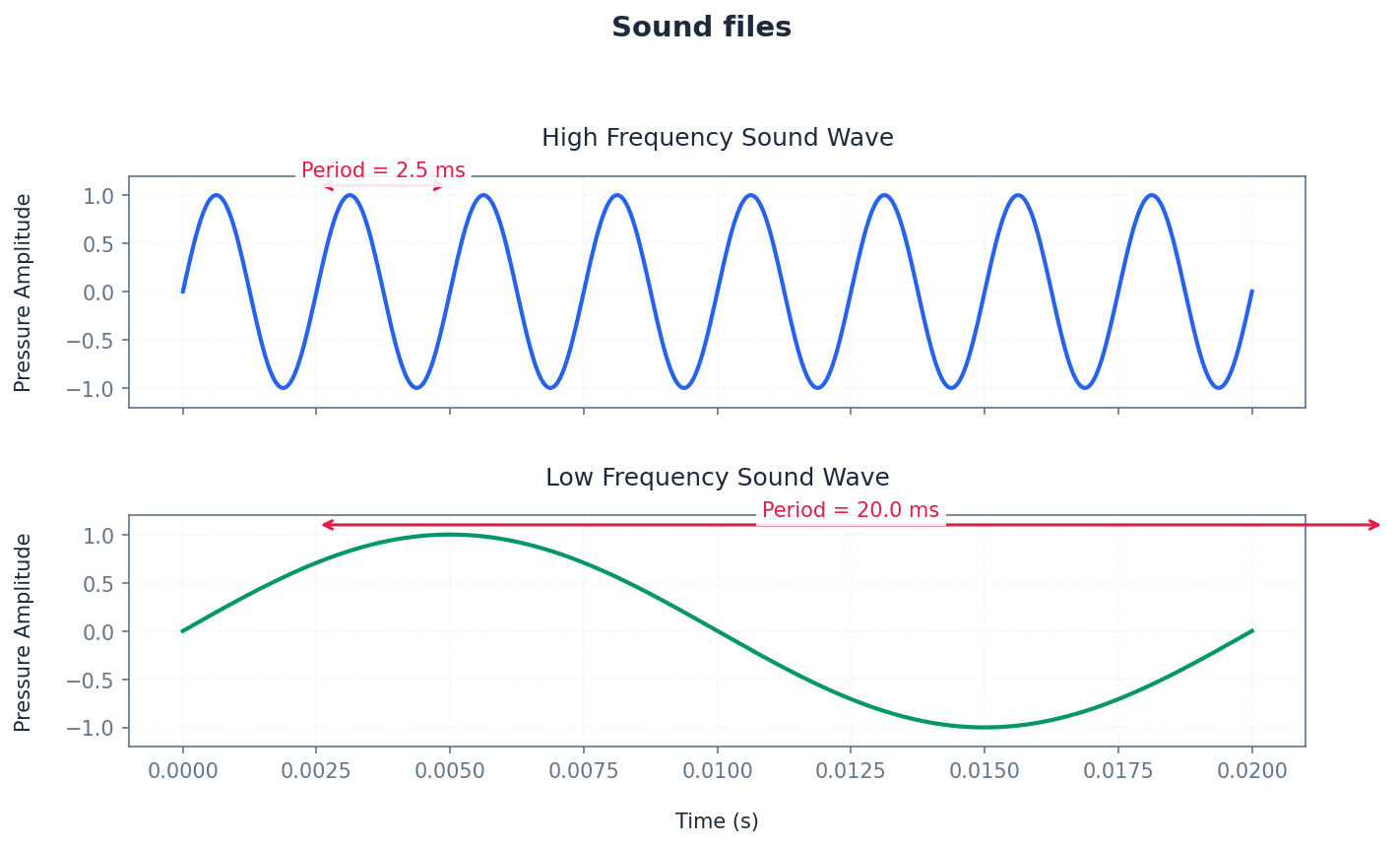
Sampling resolution — Number of bits used to represent sound amplitude (also known as bit depth).
Sampling resolution determines the precision with which the amplitude of a sound wave is measured and stored during digitisation. A higher sampling resolution (more bits) captures more subtle variations in loudness, resulting in better sound quality but larger file sizes. It's like using a more precise ruler to measure the height of a sound wave.
Sampling rate — Number of sound samples taken per second.
Sampling rate determines how frequently an analogue sound wave is measured and converted into digital data. A higher sampling rate captures more points along the wave, resulting in a more accurate digital representation of the original sound and better quality, but also a larger file size. Imagine taking more snapshots of a moving object per second.
Students often confuse sampling rate (how often samples are taken) with sampling resolution (the precision of each sample's amplitude) for sound files. Remember that rate is about frequency, and resolution is about precision.
Frame rate — Number of video frames that make up a video per second.
Frame rate determines how many still images (frames) are displayed sequentially per second to create the illusion of motion in a video. A higher frame rate results in smoother, more fluid motion but increases the video file size. It's like flipping through a stack of drawings; more drawings per second make the animation smoother.
Lossless file compression — File compression method where the original file can be restored following decompression.
Lossless compression algorithms reduce file size by identifying and encoding redundant data without discarding any information. This ensures that when the file is decompressed, it is an exact replica of the original, making it suitable for critical data like text documents or spreadsheets. It's like packing a suitcase more efficiently by folding clothes neatly.
Run length encoding (RLE) — A lossless file compression technique used to reduce text and photo files in particular.
Run-length encoding (RLE) is a lossless compression method that replaces sequences of identical data values (runs) with a single data value and a count. For example, 'AAAAABBC' becomes 'A5B2C1'. This is particularly effective for images with large areas of uniform colour or repetitive text.
Lossy file compression — File compression method where parts of the original file cannot be recovered during decompression, so some of the original detail is lost.
Lossy compression algorithms achieve significant file size reduction by permanently discarding data deemed less important or imperceptible to human senses. This is commonly used for multimedia files like images (JPEG) and audio (MP3) where some quality degradation is acceptable for smaller file sizes. It's like summarising a long book, keeping main points but leaving out details.
JPEG — Joint Photographic Expert Group – a form of lossy file compression based on the inability of the eye to spot certain colour changes and hues.
JPEG is a widely used lossy compression standard for digital images, particularly photographs. It achieves high compression ratios by discarding visual information that the human eye is less sensitive to, making it ideal for web images and storage where some quality compromise is acceptable. It's like a smart artist who knows which details in a painting you won't notice anyway.
MP3/MP4 files — File compression method used for music and multimedia files.
MP3 (MPEG-3) is a lossy audio compression format that significantly reduces the size of audio files by removing sounds outside human hearing range or quieter sounds masked by louder ones. MP4 (MPEG-4) is a broader container format that can store audio, video, images, and subtitles, also often using lossy compression for its components. MP3 is like a smart DJ who removes sounds you can't hear, while MP4 is a multimedia box for various compressed content.
Audio compression — Method used to reduce the size of a sound file using perceptual music shaping.
Audio compression techniques reduce the file size of sound recordings by identifying and removing redundant or perceptually irrelevant information. Perceptual music shaping is a key aspect, focusing on what the human ear can and cannot detect. It's like editing a recording to remove background noise and sounds too high or low for human hearing.
Perceptual music shaping — Method where sounds outside the normal range of hearing of humans, for example, are eliminated from the music file during compression.
Perceptual music shaping is a technique used in lossy audio compression (like MP3) that leverages psychoacoustics. It removes frequencies beyond human hearing and quieter sounds that are masked by louder ones, significantly reducing file size with minimal perceived quality loss. Imagine a sound engineer who knows exactly what sounds you can't hear and removes them.
Bit rate — Number of bits per second that can be transmitted over a network. It is a measure of the data transfer rate over a digital telecoms network.
Bit rate, in the context of compressed media, refers to the amount of data (bits) used per second to encode a continuous medium like audio or video. A higher bit rate generally means better quality but a larger file size and higher bandwidth requirement. Think of it as the 'density' of information in a stream.
When asked to 'explain' concepts like compression or sound representation, describe the process and the impact of parameters (e.g., higher sampling rate = better quality, larger file).
Be prepared to compare and contrast bit-map and vector graphics, focusing on their underlying data representation, scalability, and typical uses.
When discussing quality, link higher bit depth directly to better quality (more colours, more accurate sound amplitude) and larger file sizes.
Binary
Base two number system based on the values 0 and 1 only.
Bit
Abbreviation for binary digit.
One’s complement
Each binary digit in a number is reversed to allow both negative and positive numbers to be represented.
Two’s complement
Each binary digit is reversed and 1 is added in right-most position to produce another method of representing positive and negative numbers.
Sign and magnitude
Binary number system where left-most bit is used to represent the sign (0 = + and 1 = –); the remaining bits represent the binary value.
Hexadecimal
A number system based on the value 16 (uses the denary digits 0 to 9 and the letters A to F).
Memory dump
Contents of a computer memory output to screen or printer.
Binary-coded decimal (BCD)
Number system that uses 4 bits to represent each denary digit.
ASCII code
Coding system for all the characters on a keyboard and control codes.
Character set
A list of characters that have been defined by computer hardware and software.
Unicode
Coding system which represents all the languages of the world (first 128 characters are the same as ASCII code).
Bit-map image
System that uses pixels to make up an image.
Pixel
Smallest picture element that makes up an image.
Colour depth
Number of bits used to represent the colours in a pixel, e.g. 8 bit colour depth can represent 2^8 = 256 colours.
Bit depth
Number of bits used to represent the smallest unit in, for example, a sound or image file – the larger the bit depth, the better the quality of the sound or colour image.
Image resolution
Number of pixels that make up an image, for example, an image could contain 4096 × 3192 pixels (12 738 656 pixels in total).
Screen resolution
Number of horizontal and vertical pixels that make up a screen display.
Resolution
Number of pixels per column and per row on a monitor or television screen.
Pixel density
Number of pixels per square centimetre.
Vector graphics
Images that use 2D points to describe lines and curves and their properties that are grouped to form geometric shapes.
Sampling resolution
Number of bits used to represent sound amplitude (also known as bit depth).
Sampling rate
Number of sound samples taken per second.
Frame rate
Number of video frames that make up a video per second.
Lossless file compression
File compression method where the original file can be restored following decompression.
Lossy file compression
File compression method where parts of the original file cannot be recovered during decompression, so some of the original detail is lost.
JPEG
Joint Photographic Expert Group – a form of lossy file compression based on the inability of the eye to spot certain colour changes and hues.
MP3/MP4 files
File compression method used for music and multimedia files.
Audio compression
Method used to reduce the size of a sound file using perceptual music shaping.
Perceptual music shaping
Method where sounds outside the normal range of hearing of humans, for example, are eliminated from the music file during compression.
Bit rate
Number of bits per second that can be transmitted over a network. It is a measure of the data transfer rate over a digital telecoms network.
Run length encoding (RLE)
A lossless file compression technique used to reduce text and photo files in particular.
Mistake
Confusing one's complement with two's complement.
Correction
Remember that two's complement involves inverting all bits THEN adding 1 to the right-most bit.
Mistake
Misunderstanding that BCD encodes each denary digit separately.
Correction
BCD represents each denary digit (0-9) with its own 4-bit binary code, rather than converting the entire denary number to a single binary value.
Mistake
Believing that ASCII can represent all global characters.
Correction
ASCII is limited to 128 (or 256 for extended ASCII) characters, primarily English-based. Unicode is necessary for representing characters from all global languages.
Mistake
Confusing image resolution with screen resolution.
Correction
Image resolution refers to the total number of pixels within an image file, while screen resolution refers to the fixed number of pixels a display device can show.
Mistake
Assuming bit-map images can be scaled indefinitely without quality loss.
Correction
Bit-map images are pixel-based and will lose sharpness, becoming pixelated, when enlarged because the number of pixels remains fixed.
Mistake
Mixing up sampling rate and sampling resolution for sound files.
Correction
Sampling rate is how often samples of the sound wave are taken per second, while sampling resolution (bit depth) is the precision with which the amplitude of each sample is measured.